Free public beta
Describe your product in plain English.
Hawkseer interviews you, writes the spec, maps the user journeys, then codes, tests and deploys a working app you can open.
How it works
Four steps from a sentence to a link.
You do the talking and the approving. Hawkseer does the writing, mapping, building and testing — and shows its work at every step.
1 Talk
Tell Hawk what you want to build
Hawk is Hawkseer’s interviewer. Start with one sentence; it asks what a good product manager would — who it’s for, what they need to do, what’s out of scope.
Paste a Figma or Google Docs link, or drop in a PDF, DOCX or Markdown brief, and Hawk reads it too.
I want a booking page for my yoga studio. People pick a class, choose a time and pay at the door.
HawkWho’s booking — members, drop-ins, or both?
Both. Drop-ins just leave a name and an email.
HawkGot it. When a class is full, should people join a waitlist, or just see it greyed out?
studio-brief.pdffigma.com/design/… 2 Approve the spec
Approve a spec you can actually read
A spec document writes itself beside the chat as you talk — one plain document, not a form. Edit any line yourself.
Nothing is mandatory. Approve it whenever it reads right, and that version is saved.
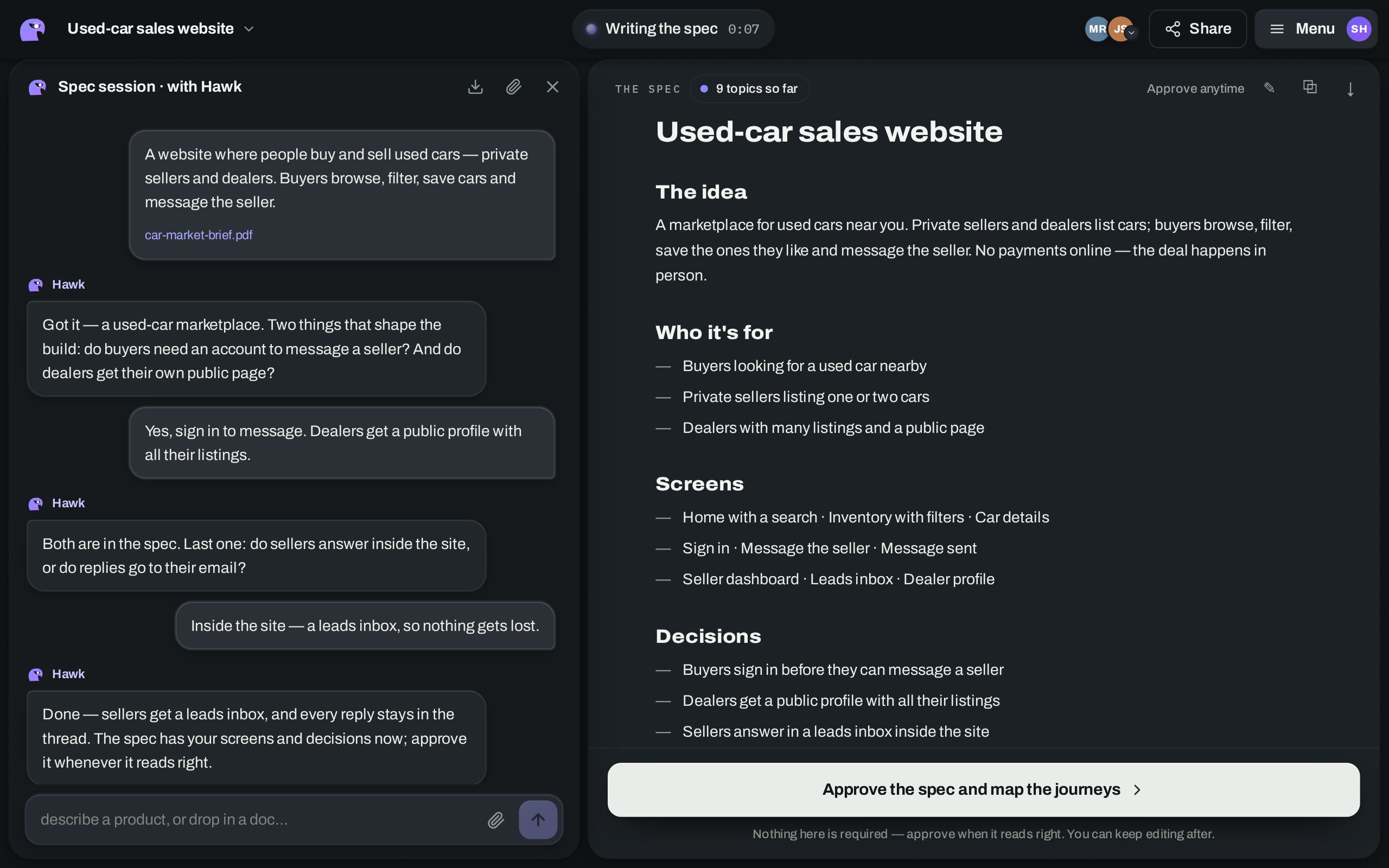
The interview on the left, the spec writing itself on the right. 3 Map journeys
Watch your journeys get mapped
Hawkseer traces every path a user takes through what you specced and lays it on a map: screens are nodes, actions are edges.
Every step links back to the paragraph of the spec it came from, so you can always see why it exists.
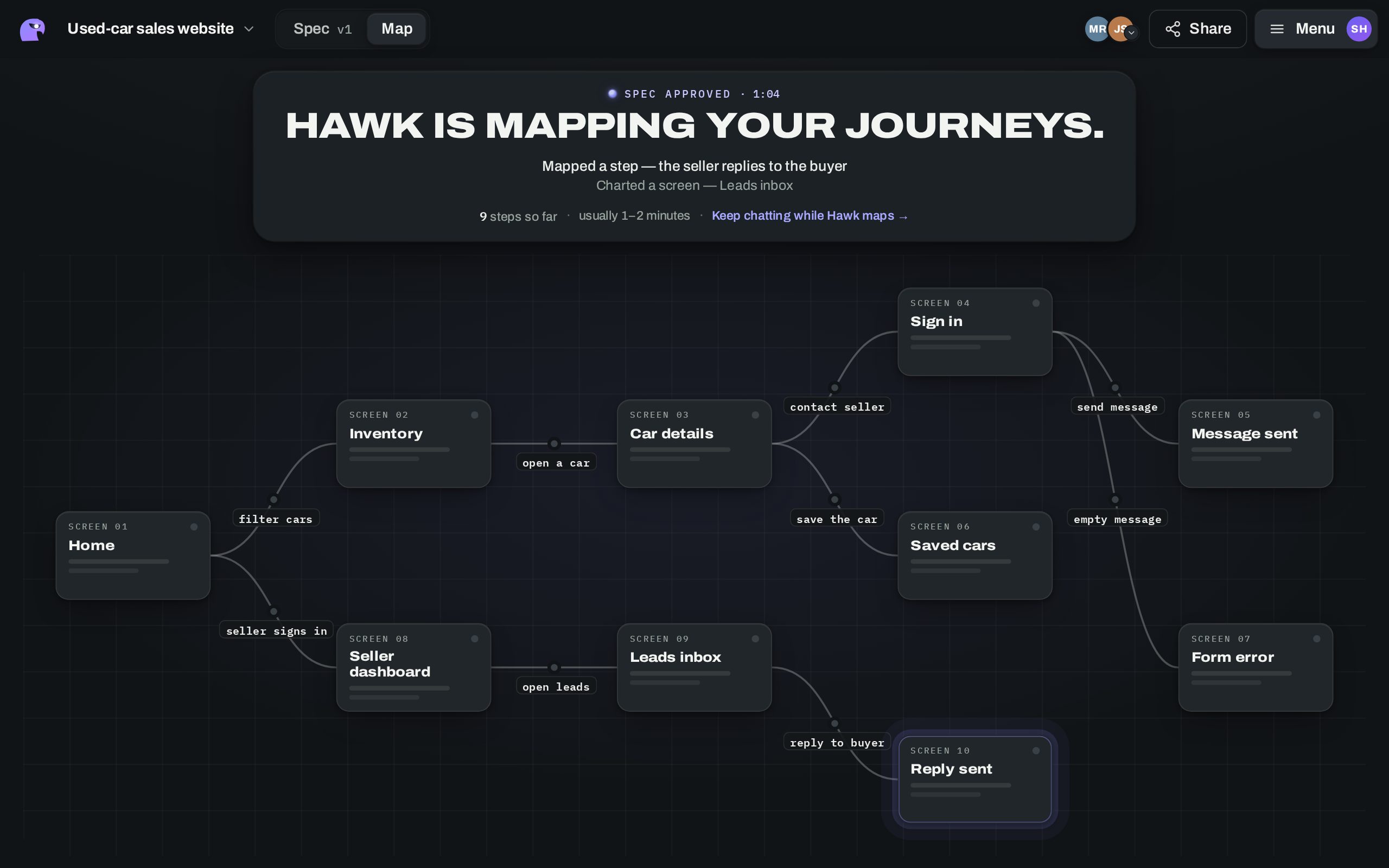
Right after you approve: the journeys being traced, step by step. 4 Build & run
Press Build. Open the app.
Each step gets its own agents: one builds it, one tests it in a real browser, one compares it to your Figma frame. The lights go blue, then yellow, then green.
Build then pushes a GitHub repository, deploys a live URL, and ▶ Run opens your app.
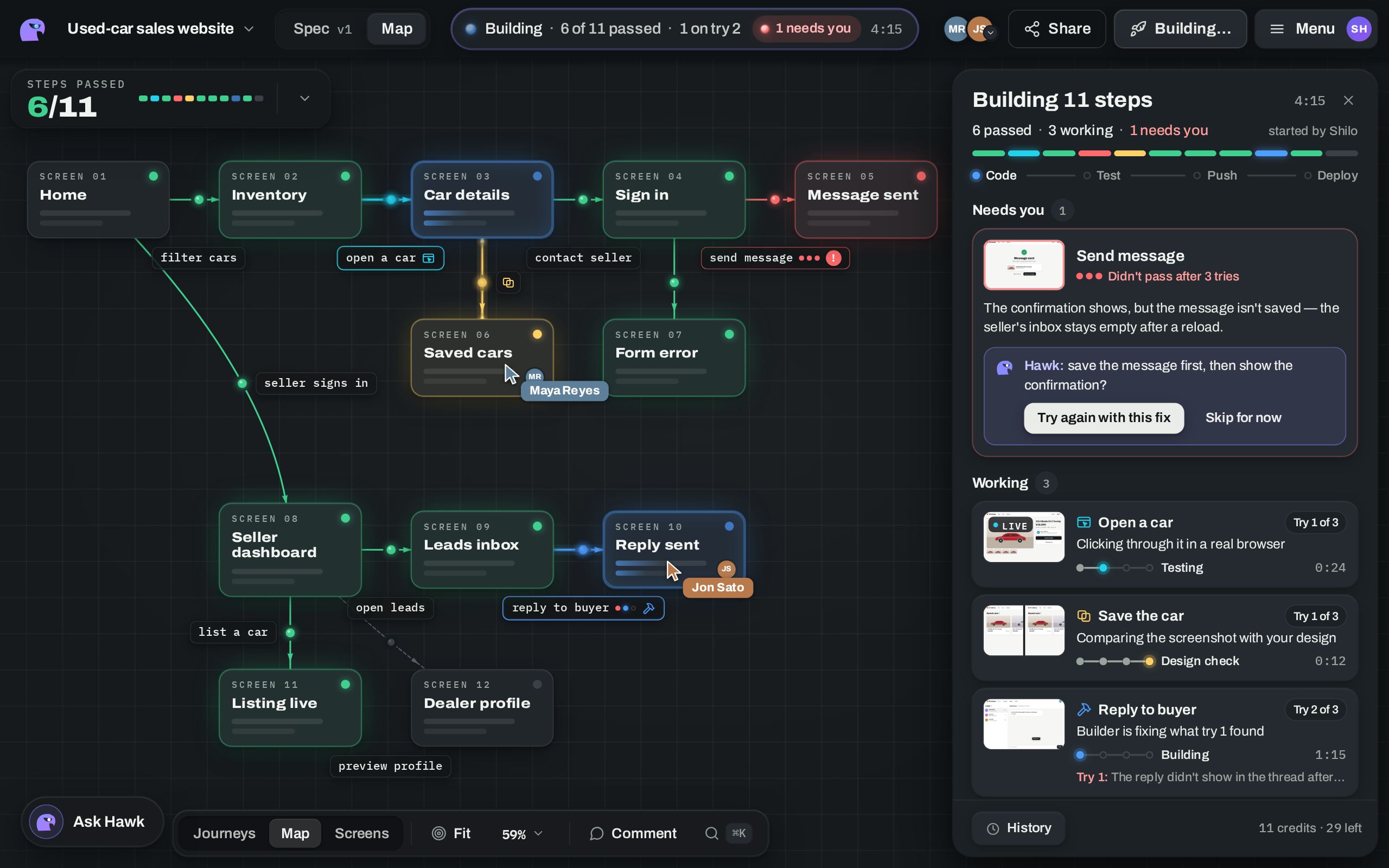
Mid-build: six steps green, three at work, one waiting on you. 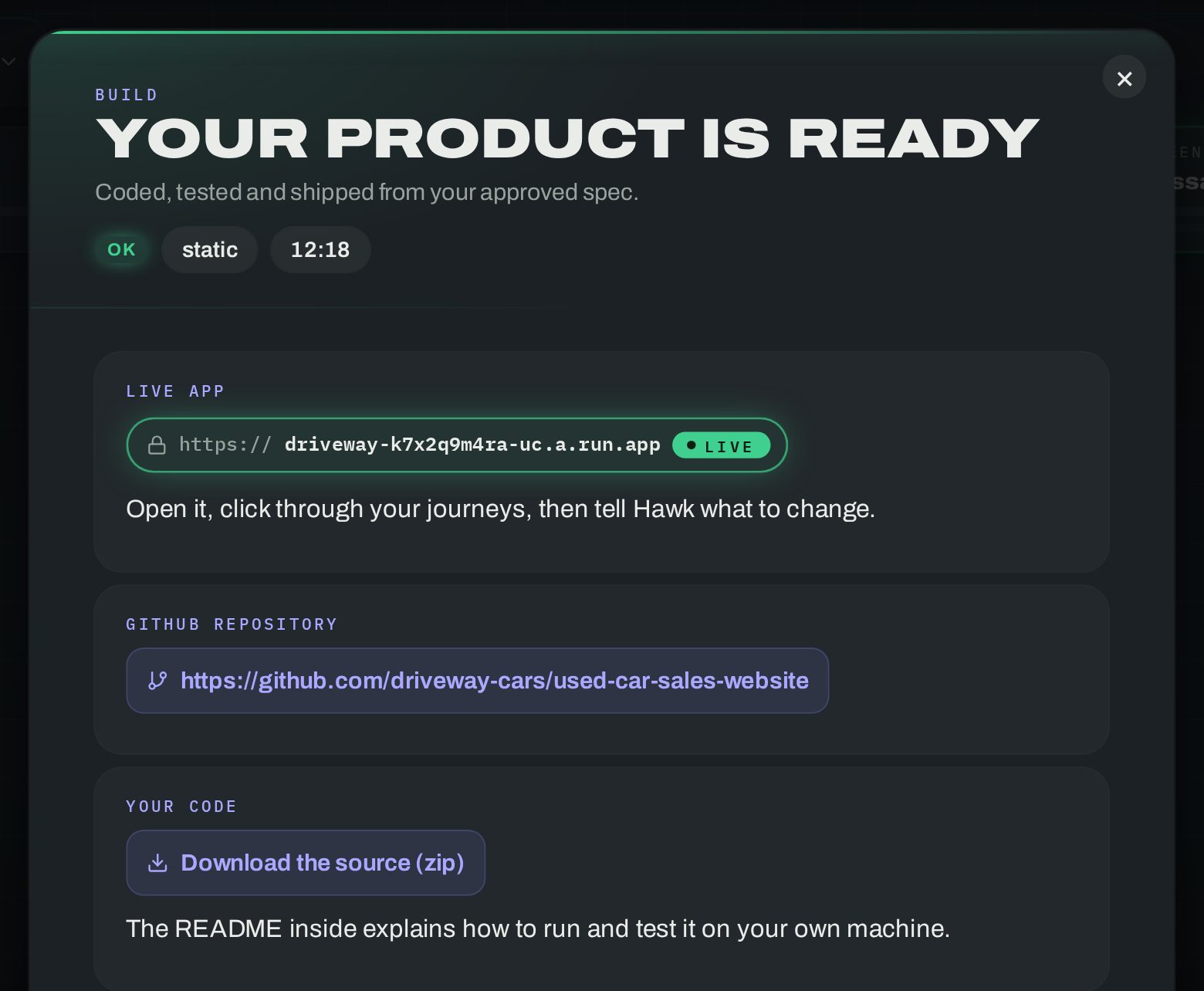
The build report: live app, repository, source.
What you get
Real artifacts, not a black box.
Spec
A spec document you own
Written live as you talk, editable by hand, saved as a version when you approve it. Every step on the map is anchored to the paragraph it came from.
Map
Journeys you can see
Screens are nodes, actions are edges. Zoom from whole journeys down to one step’s design, screenshot and test results.
Tests
Every step tested in a real browser
One agent writes the step, one walks it in a real browser against the spec, one compares the screenshot to your Figma frame. Green means passed and compared; red comes with the failing output.
Build
One button to a live app
Build writes the app, re-runs its test suite, pushes it to a GitHub repository — private by default — and deploys it to its own Google Cloud Run URL. You also get the source as a zip.
Imports
Start from what you have
Paste a Figma or Google Docs link, or drop in PDF, DOCX, Markdown and text files. Figma frames become the designs each step is compared against.
Integrations
Works from your AI assistant
Add Hawkseer as a connector — one command in Claude Code, one URL in Claude Desktop or claude.ai — and run spec interviews, journey maps and tests from inside Claude.
Set it up →Team
One map for PMs, designers and devs
Invite your team into one workspace, with roles and per-project permissions, and share a read-only status page with anyone who needs to follow along.
Monitor
See how people move through it
Once it’s live, the same journey map shows real traffic: visitors and time on every screen, the share who go from each screen to the next, where they drop off, and trends over time. Open any screen or journey to dig in — anonymous, no cookies.
Straight answers
What it’s good at today — and what it isn’t yet.
Good at today
- Small web apps with a handful of screens — booking pages, calculators, intake forms, internal tools, simple dashboards.
- Turning a rough idea or a pile of docs into a spec a developer could pick up.
- Showing exactly which steps work, with a browser test behind every green.
- Handing you something real: a live link, a repository and a zip of the source.
Not yet
- Native iOS and Android apps. Hawkseer builds for the web.
- Complex back ends — payments, third-party sign-in, heavy integrations. Expect to finish those by hand.
- Big apps, fast. Large specs build, but slowly, and more steps need a second pass.
- Building on a phone. The interview, the spec and approving work on a phone; the journey map and builds are best on a larger screen.
About the AI
Hawk and the build agents are AI, not people. AI output can be wrong or insecure, so read the spec before you approve it and test the app before you put it in front of real users. Our AI provider processes your content under its commercial terms and doesn’t train models on it.
Pricing
Pay for tested journeys, not tokens.
Spec interviews and journey maps are free. Credits are spent only when an agent builds and tests a step of your app — and during the beta, all of it is free.
Prices after the beta
- Free$0a month
- Builderfrom $29a month
- Team$49per editor a month
- Studio BYOK$15a month
- Own engine$0a month
- EnterpriseCustomfor your team
What is a credit?
One journey step built and tested by its own agent, repairs included. Spec interviews, journey maps and test re-runs are never metered. A small app is often around 20 steps, and you see the estimate before you click Build.
What happens if a step fails?
The agent that built it gets the failing test output and repairs it — repair passes are included in that step’s credit. If it’s still red, the step shows you why, so you can change the spec or ask Hawk to take another approach.
Do I own the code?
Yes. Your specs, journey maps and generated code are yours. Build pushes the code to a GitHub repository — private by default — and invites your GitHub account as an admin, so you can see it and transfer it into your own account. Every build also gives you the full source as a zip.
Is Hawk a person?
No — Hawk and the build agents are AI, not people. AI output can be wrong or insecure, so review the spec and test the app before you rely on it in production. The privacy policy names the AI provider we use.
Is my data used to train AI models?
No. We don’t train models on your content, and our AI provider doesn’t train on content sent through its API under its commercial terms. The privacy policy says what we store and for how long.
Is my idea private?
Your chats, specs and maps are visible only to people in your workspace, and repositories are private by default. The live app URL is public — anyone with the link can open it — so keep real customer data and secrets out of beta apps.
What does it generate?
Whatever fits the spec: plain HTML and JavaScript for simple apps, or a small Python or Node.js web app when it needs a server. Every app ships with a README, real tests and a run_tests.sh, so a developer can pick it up.
How long does a build take?
The interview and the map take minutes. A full build of a small app often takes 15–30 minutes, because every step is built, tested and compared — you can watch each step’s light change as it goes.
Can I host it myself?
Yes. Download the source or take the repository and run it anywhere. On Team, Hawkseer can deploy into your own Google Cloud.
What does the beta cost, and what happens after?
Nothing: Hawkseer is free during the beta. When paid plans start we’ll tell you ahead of time; nothing is charged unless you choose a plan, and what you built stays yours.
The first message is on you. Everything else is on us.
Start freeSign in with Google · 40 build credits a month plus your first app, free during the beta